Document Desk is a Windows desktop app for sorting PDFs that are already on your computer. It reads the text layer, proposes categories from rules you write, and asks you to confirm each suggestion before it exports a CSV manifest, an index PDF and a ZIP of the originals. The files never leave your machine.
- Platform
- Windows 10 / 11, 64-bit (x64)
- Version
- 0.2.0
- Runs
- On your PC, offline
- Trial
- Export up to 50 files before activation
- License
- $39 once, 2 devices
- Updates
- Every 1.x update included
- Refunds
- 14 days
Download 0.2.0 for Windows Pricing
Secure checkout by Creem. One-time payment, two devices, 14-day refund. The licence key arrives by email with the Creem receipt and also appears in the Creem customer portal. The installer is downloaded from this site.
What it does
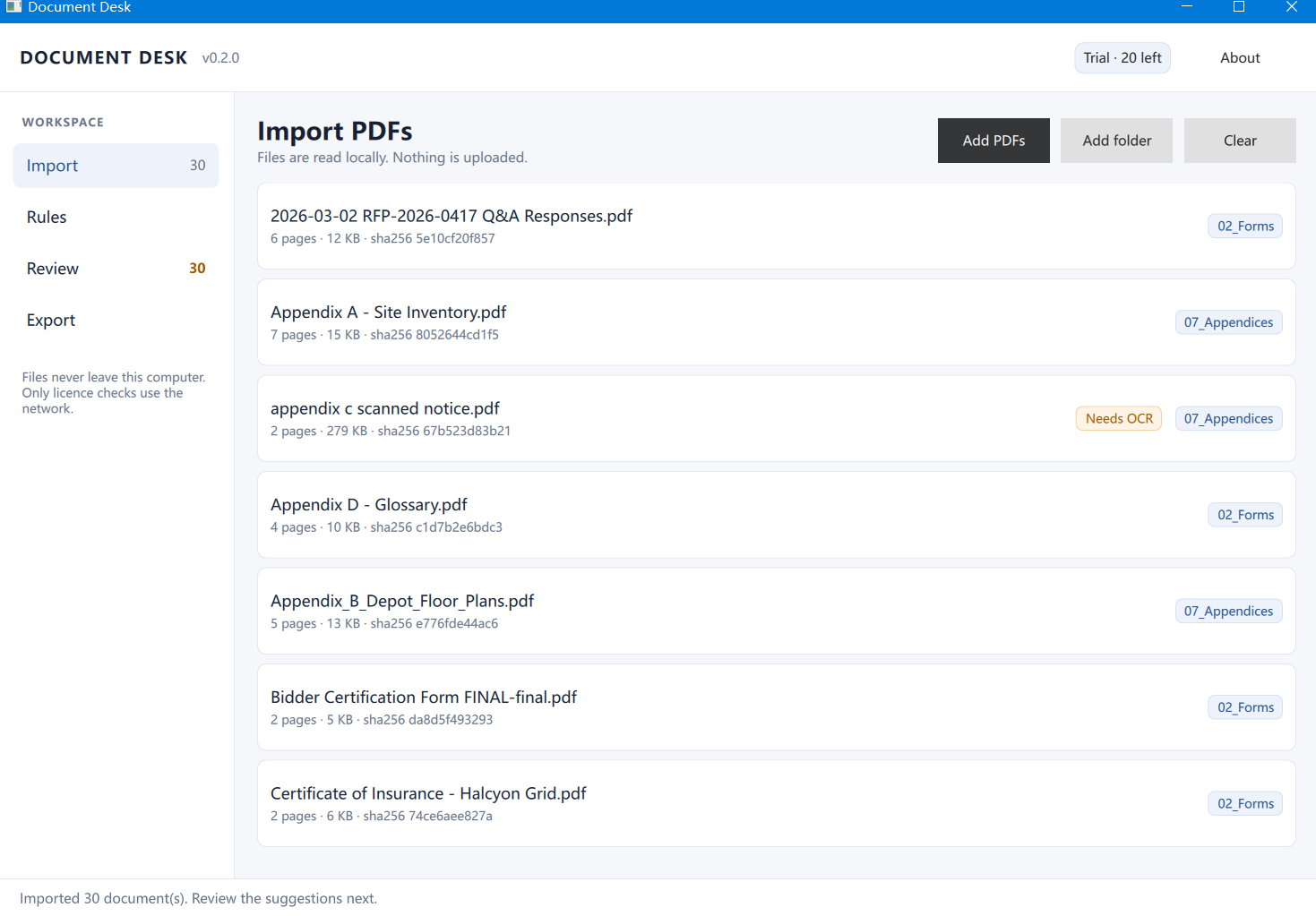
1. Import PDFs
Select several PDFs at once, or drag a folder into the window. Each row shows the file name, size, page count, the first 12 characters of the file’s SHA-256, and whether the PDF has a text layer. Only PDFs are imported; other file types are rejected and named in the import report.
2. Classify with your rules
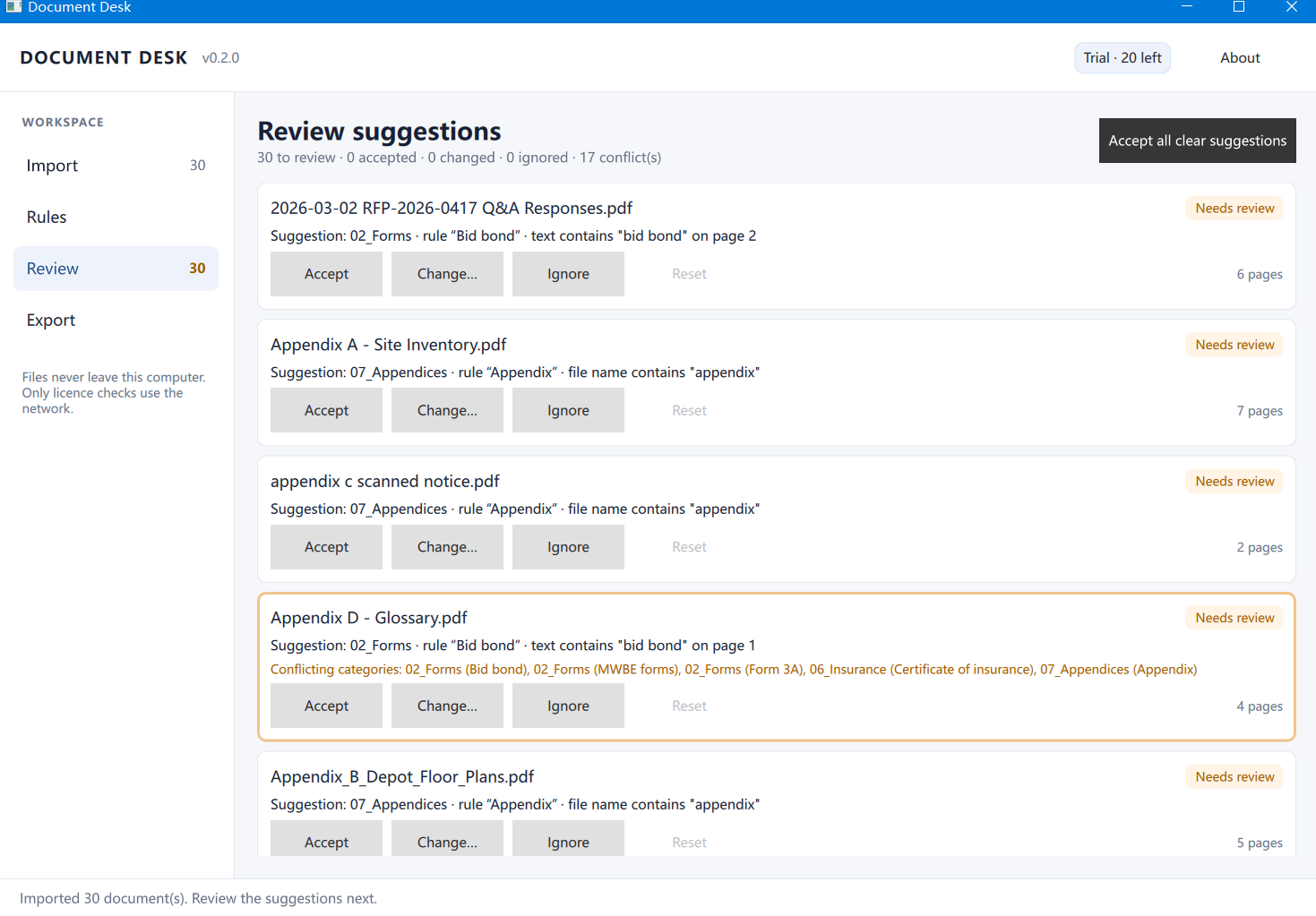
A rule has a name, a condition and a priority. Conditions match on file name, text, page count or file size. Every hit is explained with the rule name, the file, the page and the keyword that matched. When several rules match, priority decides the suggestion; the other matches stay visible as evidence, and conflicting categories are flagged for a person.
3. Confirm by hand
Accept, change or ignore each suggestion. A suggestion you have not touched is exported as Needs Review; it is never presented as a decision you did not make. Changed suggestions keep the original rule hit as evidence.
4. Export
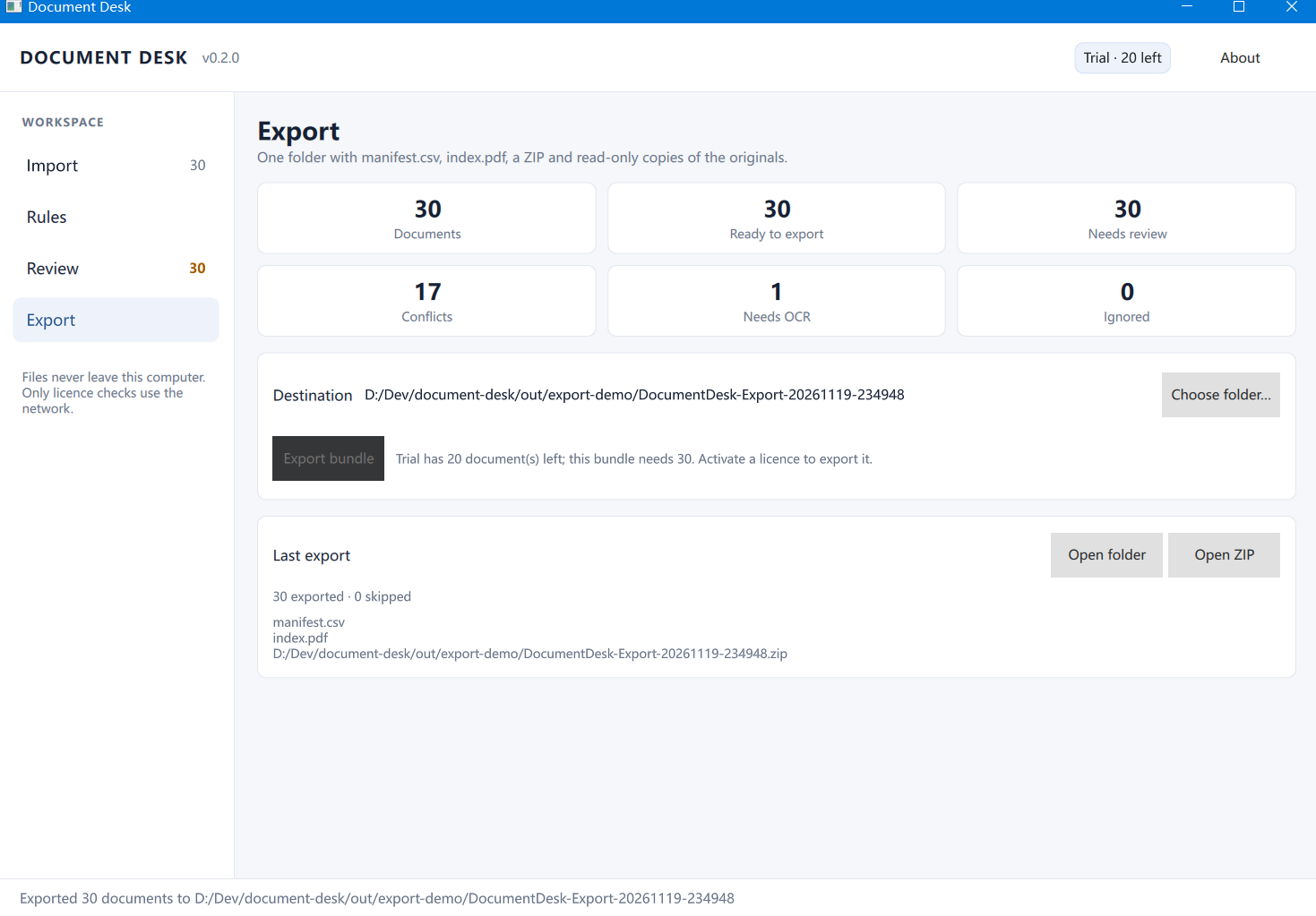
You choose an output folder, and the app writes three outputs:
manifest.csv— one row per file with name, size, page count, SHA-256, category, review state, matched rule, matched page and matched keyword.index.pdf— a contents tree per confirmed category, with the source page number for each entry.- a ZIP of the originals — the PDFs themselves, unmodified, plus the manifest so the hashes travel with the files.
Originals are opened read-only. The app does not write to them, does not move them, and their hashes can be checked after export.
Sample output
These files come from one export run on 30 synthetic PDFs. They are what the app wrote — not a mock-up.
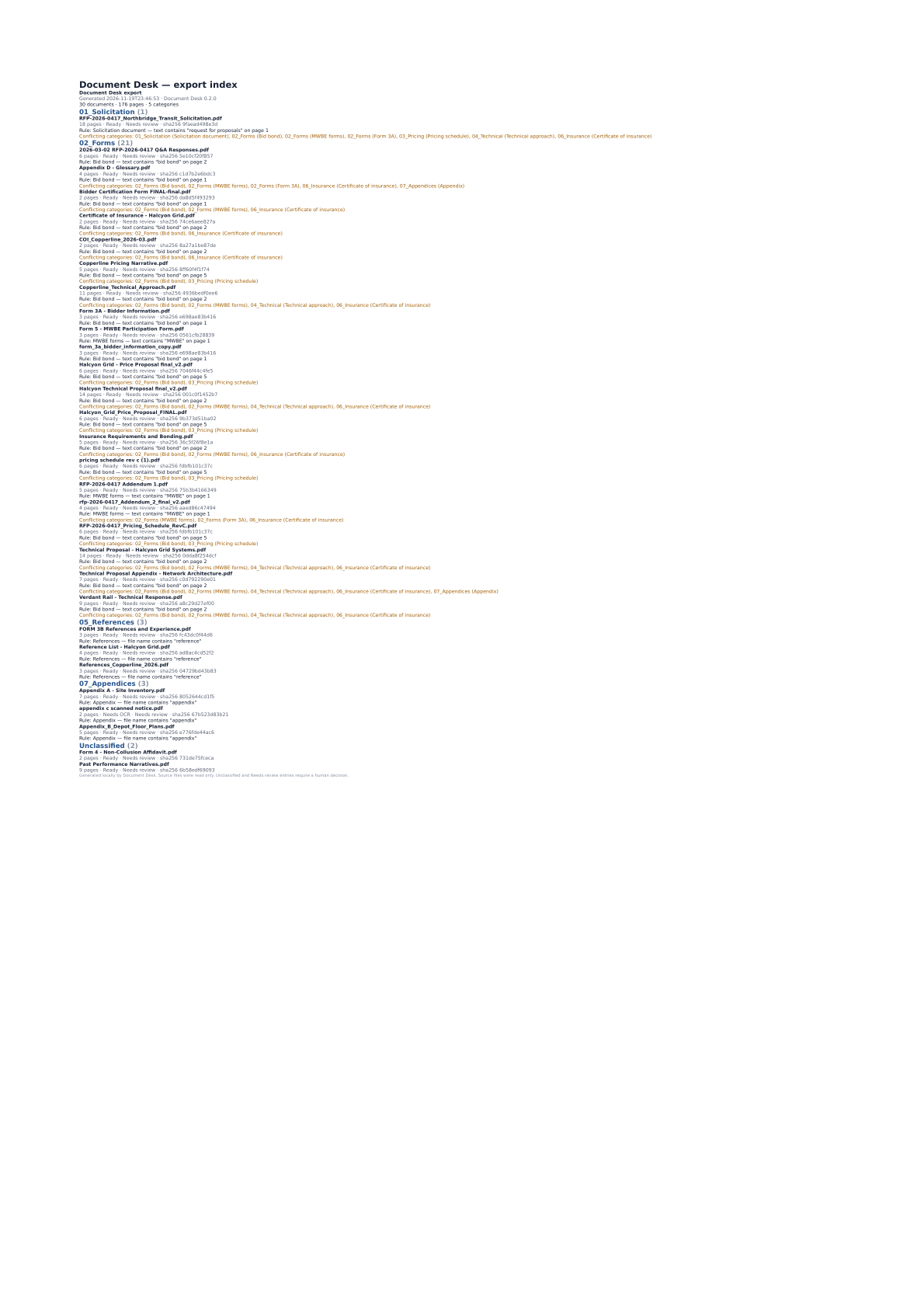
index.pdf, page 1 — 30 documents, 176 pages, 5 categories, with the rule and page that produced each entry.The first five rows of manifest.csv:
| File | Pages | Text layer | Suggested | Matched rule | Decision |
|---|---|---|---|---|---|
| 2026-03-02 RFP-2026-0417 Q&A Responses.pdf | 6 | Yes | 02_Forms |
Bid bond — text contains “bid bond”, p.2 | Needs Review |
| Appendix A - Site Inventory.pdf | 7 | Yes | 07_Appendices |
Appendix — file name | Needs Review |
| appendix c scanned notice.pdf | 2 | No | 07_Appendices |
Appendix — file name | Needs Review |
| Appendix D - Glossary.pdf | 4 | Yes | 02_Forms |
Bid bond — text contains “bid bond”, p.1 | Needs Review |
| Appendix_B_Depot_Floor_Plans.pdf | 5 | Yes | 07_Appendices |
Appendix — file name | Needs Review |
Two things in that table are worth pointing at.
Every row says Needs Review. That is not a defect. The app never turns its own suggestion into your decision; a row only stops saying Needs Review after a person accepts or changes it.
Row 4 is a rule that got it wrong. The glossary mentions “bid bond”, so the Bid bond rule matched it and filed a glossary under Forms. Because the row is still Needs Review, nothing was recorded as decided, and the review screen flags the conflicting categories for a person to settle.
Download the full sample export (ZIP, 570 KB) index.pdf manifest.csv
The ZIP holds index.pdf, manifest.csv and the 30 original PDFs. One column was rewritten before publication: source_path is relative here (incoming/…) instead of the absolute path on the machine that ran the export. Every other field is unedited. All 30 PDFs are synthetic; no customer file is included.
Screens from the Windows build
Captured from 0.2.0 with synthetic demo data. No customer files are shown.
What 0.2.0 does not do
No OCR
Scanned pages are not read
A page without a text layer is marked Needs OCR. No text is invented, guessed or filled in from the image, and text rules cannot match it.
No cloud
No upload, account or sync
There is no account system, no document upload and no cloud sync. The only network request the app makes is license activation and verification.
PDF editing
No merge, split or encryption
The app reads PDFs and writes its own outputs. It does not merge, split, encrypt, decrypt or repair PDFs, and it does not rewrite your originals.
Platforms
Windows only, for now
Windows 10 and 11, 64-bit. macOS is planned; there is no macOS build and nothing to download for it.
Price
A license is $39 once and covers two devices, every 1.x update and a 14-day refund window. Without a license you can still import, review and export up to 50 files. There is no subscription. Details are on Pricing, and checkout is handled by Creem.
Requirements and support
Windows 10 or Windows 11, 64-bit. Processing does not need an internet connection; activation and license verification do. The installer is not code-signed yet, so Windows SmartScreen may warn you — the download page explains how to check the file first.
Support is by email at support@jaredtao.com. One address, no phone line and no live chat.